The store will not work correctly when cookies are disabled.
AppleCare+
By proceeding you are agreeing to be bound by the Terms and Conditions of Sale and the AppleCare+ Terms & Conditions. These are standard terms on which we intend to rely. For your own benefit and protection it is important that you read the Terms and Conditions of Sale, the AppleCare+ Terms and Conditions, the Key Facts Document and the Initial Disclosure Document carefully before you do so. If you do not understand anything, or have any questions, please call the Apple Contact Centre www.apple.com/uk/support/.
I am resident in the United Kingdom, but I do not reside on the Isle of Man or the Channel Islands.
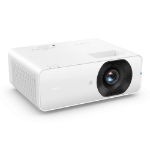
BenQ Business Projector LH660 | 4600AL 1080P Laser Projector with RJ45 Bult-in, 1.3x Big Zoom
Always Connected, Always Up to Date Direct Connection to BenQ QOTA Cloud The enhanced RJ45 LAN port enabling seamless connection to the BenQ QOTA cloud. You can receive and install firmware updates directly from the projector without using a PC or USB drive.
Convenient Firmware Updates Support on-device firmware update
Easy LAN Integration Built-in RJ45 port with support for real-time firmware updates
Flexible Wireless LAN Optional 5201BS dongle enables Wi-Fi connectivity via the built-in RJ45 interface
Seamless System Compatibility Support AMX and PJ-Link platforms, ensuring seamless Integration with established room controllers.
One Platform, Total Control
Manage Every BenQ Device with BenQ DMS Monitor and manage all your BenQ devices through the BenQ Device Management System (DMS) software from your administration computer over your company LAN (DMS Local) — and stay connected even outside the office with the DMS App (DMS Cloud *). Gain complete visibility, centralized control, and seamless access from anywhere.
DMS Local The IT Staff use a computer connected to the company LAN to control and manage all projectors directly within the office network.
DMS Cloud By activating Agent Mode* in the DMS software, the local DMS system syncs with the DMS Cloud.
(*In the future, projectors will be able to connect directly to the cloud without needing an Agent computer. This will enable real-time projector status updates. Stay tuned.)
Total Command Manage all devices from one dashboard
Actionable Analytics Monitor BenQ Devices status and performance data to make smarter decisions
Fast Setup Onboard every BenQ device quickly before your meeting starts
Casting Your Screen Wirelessly Enjoy driver-free wireless casting with seamless support for iOS, Android, and Windows. Display up to Four devices at once with 4-way split screen for effortless collaboration.
BYOD Supports iOS, Android & Windows. Easy casting across devices
4-Way Split Screen Display up to four devices simultaneously
Displayed exactly as intended Selecting the right color mode ensures crisper, clearer images compared to a single default mode.
Presentation Mode Optimized saturation for clear communication in slides, reports, and meeting content.
Video Conference Mode Natural skin tones for a more professional look on camera.
High Detail Mode Sharper contrast for diagrams, code, and blueprints.
DICOM Simulation Mode Medical-grade accuracy when displaying digital images, with no loss of detail.
*DICOM Simulation mode is intended for training purposes only and not for medical diagnostic use.
High Reliability, Easy Maintenance Laser Phosphor delivers up to 30,000 hours of reliable brightness with no lamp replacement. Durable, efficient, and mercury-free for a more eco-friendly workplace.
Lower Total Cost Ownership Long-lasting brightness with lower power consumption helps reduce operating and maintenance costs.
Eco-Friendly & Mercury-Free Mercury-free laser light source for a cleaner, more environmentally friendly design.
Projection Fits for Every Room Project images larger than 100” from just 2 m~3 m away (via 1.3X zoom), enabling easy big-screen viewing in rooms of any size.
Flexible Installation & Connectivity Experience seamless connectivity with our LH660 projector featuring two HDMI ports and two USB ports. It supports external Wi-Fi Screen Casting (e.g. QP30) and Wi-Fi RJ45 adapters (e.g. 5201BS).
RJ45 (LAN) Network control for DMS management & OTA updates.